
A step-by-step guide for tailors and fashion brands — planning, shooting, designing, and distributing a lookbook that converts buyers into clients.

If you’re a tailor, pattern maker, fashion designer, or shop owner, a lookbook is one of the most powerful sales and branding tools in your arsenal. It tells buyers who you are, shows clients what you make, and communicates the quality of your craft – often before you say a single word.
This guide will walk you through everything: what a lookbook actually is, how to plan and shoot one, how to design it, and how to get it in front of the right people. We’ll also cover how tools like AI Photoshoots are changing the game for fashion professionals who need fabric-accurate imagery without a full photo shoot.
Let’s build your lookbook.
Before we dive into the how, let’s get clear on the what.
A lookbook is a curated visual collection that showcases your garments in a styled, editorial context. It’s designed to communicate your brand identity, your aesthetic point of view, and the quality of your work — all at once.
Think of it as your brand’s visual pitch.
These three formats get confused all the time. Here’s the simple breakdown:
| Format | Purpose | Tone | Best Used For |
|---|---|---|---|
| Lookbook | Tell a brand story through styled looks | Editorial, emotional | Buyers, clients, launches |
| Catalogue | List products with specs and pricing | Functional, informational | Wholesale orders, B2B sales |
| Portfolio | Showcase your craft and range | Professional, documentary | Job applications, commissions |
A lookbook sells a feeling. A catalogue lists the facts. A portfolio proves your skill.
For most tailors and fashion brands, a lookbook is the highest-converting format for a seasonal collection. It creates desire before the buyer even thinks about price.
If any of the following describe you, the answer is: you should.
If you make beautiful things and not enough people know about it, a lookbook is how you change that.
This is the step most people skip — and it’s why so many lookbooks feel disjointed and fail to convert.
Great lookbooks are planned, not improvised.

Start with one question: Who is holding this lookbook, and what do I want them to do next?
Your answer shapes every decision that follows.
Here are the three most common purposes:
Each of these requires a different emphasis in photography, copy, and design. Know your purpose before you pick up a camera or open a design tool.
The industry standard for a seasonal lookbook is 8–15 looks. Fewer than eight feels light; more than twenty overwhelms buyers. For most tailor shops and independent designers, 10–12 looks is the sweet spot.
Once you have your number, think about how to group them:
Then go one step further: give your collection a narrative arc. The best lookbooks tell a story from the first page to the last. Where is your customer going? What are they feeling? What does this collection represent?
Even a simple arc — morning light to evening darkness, city to countryside — elevates a lookbook from a product display to an experience.
Tip for tailors: If you’re showcasing variations of a signature silhouette (say, your house cut for a single-breasted suit), vary the fabric, the accessories, and the shot location to prevent repetition. Same architecture, different mood.
Here’s what you can realistically expect to spend:
| Budget Level | What’s Included | Estimated Cost |
|---|---|---|
| DIY | Smartphone camera, free design tools, self-styling | $0–$200 |
| Semi-professional | Freelance photographer, Canva Pro, basic styling | $300–$1,200 |
| Professional | Photographer, model, MUA, stylist, design | $2,000–$5,000 |
| Full production | Above + print run, art direction, retouching | $5,000–$12,000+ |
Cost-saving tips for tailor shops and indie designers:
Photography is where most lookbooks succeed or fail. Stunning garments shot poorly will lose to average garments shot beautifully.
Here’s how to approach it like a professional.

You don’t need professional runway models, but you do need people who wear your clothes well.
Options at different budget levels:
Styling checklist for shoot day:
Note for tailors specifically: Press your garments on the day. Wool and structured fabric shift overnight. A jacket that looked perfect the night before can lose its shoulder line by morning.
Location types and when to use them:
Every lookbook needs these four shot types:
The detail shot is the one tailors consistently underuse. It is exactly what sets your work apart from mass-produced garments. Don’t skip it.
On lighting for different fabrics:
Batching efficiently:
If you’re shooting on a smartphone:
Let’s be honest — not every collection is ready for a camera.
Maybe the garments are still in production. Maybe your photography budget ran out. Or maybe a client wants to see their commission in three different fabrics before you cut a single piece.
That’s exactly where Scanatic Studio changes the game for tailors.

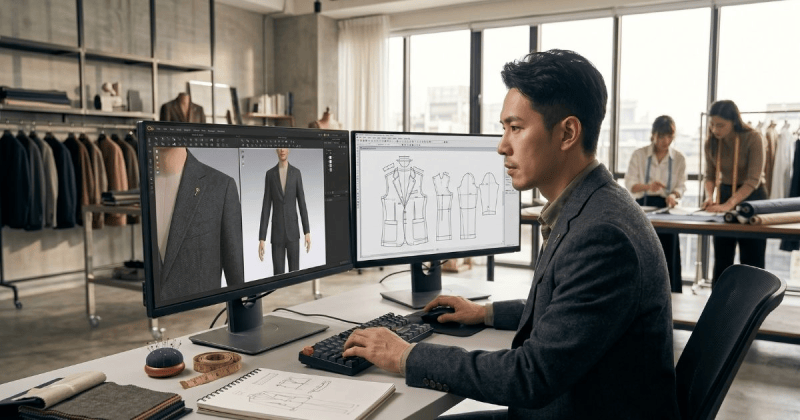
Scanatic Studio is a 3D design tool built for tailors and menswear professionals. It’s not a generic fashion software that happens to include suits. It was built from the ground up for the way tailors actually work — with real fabric, real construction details, and real client expectations.
The centrepiece is the TG3D Studio Menswear Collection: 28 unique 3D garments purpose-built for tailoring professionals. The library covers the full range of a menswear workroom:
And it doesn’t stop at the shell. Scanatic Studio includes a vast library of trims — buttons, buttonholes, pocket styles, lapel variations, lining details — so you can configure each look down to the finishing details before a single stitch is sewn.
You can scan your own fabrics. This is the feature that sets Scanatic apart for working tailors. You can scan your own fabric swatches and import them directly into the tool. Your house cloth — the Harris Tweed you’ve been using for five seasons, the Italian wool-cashmere blend your clients love — renders on the 3D garment with the exact texture and colour. The result is a lookbook image that shows your garment, in your fabric, constructed your way. Not an approximation. Not a stock render. Your work.
Once your garment is configured — silhouette, fabric, trims — Scanatic Studio takes it one step further with AI image generation built directly into the workflow.
This isn’t a separate tool or a prompt-and-hope process. The AI generation is informed by your specific garment, your fabric, and your trim selections. The output is a styled, editorial-quality image that reflects the actual garment you’ve designed — not a generic suit that happens to be the right colour.
For lookbook creation, this means:
Here’s how tailors and menswear designers use Scanatic Studio as part of a complete lookbook production process:
For pattern makers, the value is even more specific. You can present a finished, styled lookbook image to a client or buyer from a flat pattern — before sampling, before production, before cost is committed.
Traditional lookbook photography is linear. You sew, you press, you shoot, you publish.
With Scanatic Studio, that process runs in parallel with your production:
For tailor shop owners running lean teams, that’s not just convenient — it’s a genuine competitive advantage over shops still relying entirely on finished photography.
You’ve got your images. Now it’s time to build the actual lookbook.
This is where a lot of great photography gets buried under bad design decisions. Let’s not let that happen.
| Tool | Best For | Cost | Skill Level |
|---|---|---|---|
| Canva Pro | Beginners, fast turnaround, digital-first | ~$15/mo | Low |
| Adobe InDesign | Professional print-ready output, full control | ~$55/mo | High |
| Adobe Express | Mid-level, template-heavy, quick layouts | Free / $10/mo | Low–Mid |
| Affinity Publisher | Budget InDesign alternative, one-time fee | $70 one-time | Mid |
| Issuu | Publishing and distributing digital flipbooks | Free / $19/mo | Low |
| Flipsnack | Interactive digital lookbooks with analytics | Free / $14/mo | Low |
Our recommendation:
Good lookbook design is mostly about restraint.
The rules:
Every lookbook needs these pages:
Keep it simple. Seriously.
Font pairing that always works:
Color:
Lookbooks are visual-first, but the right words make a real difference.
What to include:
You don’t have to choose. But you do need to know when each format serves you best.

Print lookbooks still have enormous power in the right context. There is something about holding a beautifully made physical object that a PDF cannot replicate, and for a tailor selling the experience of beautiful craftsmanship, that matters.
Print when you’re:
For most independent tailors and small fashion brands, digital distribution delivers far more reach per dollar spent.
Go digital when you’re:
Before you go to production, run your lookbook through this checklist.
Most professional lookbooks run between 8 and 24 pages. For a seasonal collection, 12–16 pages is the sweet spot — enough to tell a visual story without losing the reader. One to two looks per spread, plus cover, opening, and back page, gets you there naturally with 10–12 looks.
A DIY digital lookbook can cost as little as $0–$50 using free tools and your own photography. A semi-professional lookbook with a freelance photographer and Canva Pro runs $300–$1,200. A full professional production — photographer, model, MUA, stylist, print — typically ranges from $2,000 to $8,000+ depending on your market and specifications.
The most common lookbook dimensions are A4 (210×297mm) for print. For digital and social, portrait (1080×1350px) or square (1080×1080px) formats work well for platform-optimized distribution. For PDF email distribution, A4 portrait is the universally accepted standard.
Yes — Canva is one of the most popular tools for lookbook creation, especially for designers and tailors who don’t have graphic design backgrounds. Canva Pro (approximately $15/month) gives you access to premium templates, fonts, and the ability to resize your design across formats. For print-quality output, export as PDF Print at 300 DPI and enable the bleed marks option.
A lookbook is editorial and emotional — it sells a lifestyle, a brand identity, and a feeling. A catalogue is functional and informational — it lists products with SKUs, prices, and specifications. Both serve different purposes, and mature brands often use both: the lookbook opens the relationship, the catalogue closes the order.
A great lookbook doesn’t require a huge budget. It requires clarity, intention, and the right tools.
Know who you’re making it for. Plan your looks with a narrative in mind. Shoot with an eye for detail — or render with fabric accuracy using a tool built for how tailors actually work. Design with restraint. Distribute with purpose. And measure what happens next.
Your craftsmanship deserves to be seen. A lookbook is how you make sure it is.

Ready to go further? Explore how to price a bespoke tailoring collection, or discover the best tailor software tools for growing your fashion business in 2025.
The lookbook is never just a document. It’s the first conversation your brand has without you in the room. Make it count.

